
Two weeks after mynd shipped, I sat down with cbvivi (Wang Xiaoguang) to record an episode about his new app, mynd. In his own words, it is “a chat-style front end for writing Markdown files.” cbvivi was one of China’s earliest vloggers, and a veteran podcast host. Further back, he was an editor at a magazine, and ran a long-running iPhone homescreen observation column on his personal blog. mynd is not the product of a developer who decided to make an app. It is what happens when someone who has spent most of his life watching how other people use software finally decides to build one himself.
Ten Years of Quick Capture
cbvivi told me that from the moment he started using a smartphone, one of his most constant use cases has been capturing ideas quickly. For years he was a heavy Drafts user, and later moved to Obsidian. The plugin that made the biggest impression on him there was Daily Notes. Every day it auto-generates a dated document. It can be empty, or packed full, but there is always a new one waiting the next day. By contrast, every note in Drafts is its own document, and once you have a few thousand of them, searching or organizing becomes almost impossible.
The Action Button on the iPhone 15 Pro completed the loop. He bound a shortcut called “Genius Idea” to it, so one press wrote straight into his Obsidian vault. He built an entire workflow around this setup, and came to depend on it deeply.
The trouble was that none of it was something he could recommend to a friend or a family member. Obsidian plus plugins plus Shortcuts plus a Markdown vault is a setup only a specific kind of person is willing to spend a weekend configuring, and Obsidian’s tutorial ecosystem has exploded again in the past few months, which only raises the bar. Earlier this year, he started pointing AI tools at the notes he had accumulated. We had talked a few times before about how Claude Code had become genuinely usable at processing files across folders, and he fed his vault into it. Somewhere in that process, he began seriously wondering whether he could build a product that did not require that entire stack underneath, something people could simply pick up and use.
The Moment He Decided
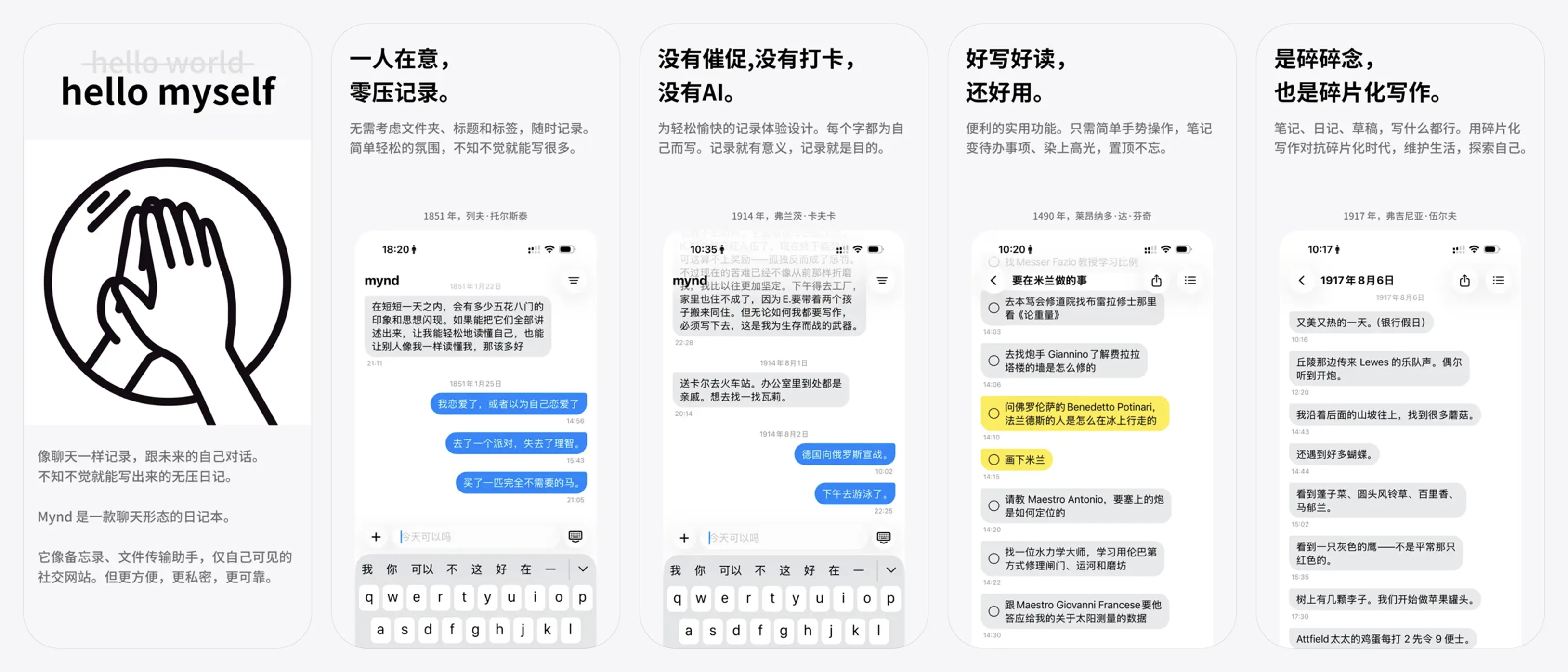
The moment he actually decided to build it was when he thought of combining Daily Notes with a chat interface. “Once I had that, everything just fell into place. The idea felt brilliant,” he said.
Looking back, he says two things went his way. The first was the blind confidence that only comes from not knowing anything. He had done no competitive research at all. If he had, he would have discovered that chat-with-yourself note apps are everywhere. China, Japan, and the US all have dozens of them, and some have far cleverer interactions. Japan has an app called 一人会議 (Solo Meeting). Another chat app splits the send button in two, so pressing the left one sends a message on the left, and the right one sends on the right. If he had seen any of that up front, his personality would have convinced him the idea was not that special, and he probably would not have built it.
The second piece of luck was that Claude implemented a gesture he did not expect to work. He wanted to let users swipe a bubble from one side to the other. When he put in the request he was nervous, since an interface-level change like that seemed like the kind of thing you could only hope to get a rough implementation of. What Claude produced had natural elasticity built in, and was arguably better than the version that eventually shipped. “Wow, I thought, being able to get to this level completely blows past what I imagined was possible.” That was the moment he felt the product was real.
The left-and-right bubbles in mynd are simpler than most people assume. Messages from the current session sit on the right. Once you put the app into the background long enough for the process to be reclaimed and then reopen it, those messages move to the left. They have become history, in a sense. Messages on the left can be freely moved, and dragged back to the right, because history can be rearranged. Messages on the right cannot, because the conversation is still in progress.
Don’t Lose a Note
cbvivi and Claude defined mynd’s highest-priority rule together: do not lose data. He would rather the app crash repeatedly than drop a single note. Every note lives in three places at once: iCloud, local storage, and memory.
Since the beta, two users have confirmed losing notes. One was writing when a test build froze before any of the protections could kick in. The other ran into an iCloud multi-device conflict where one device overwrote another.
Bug reports make him anxious, in large part because he cannot verify the code with his own eyes. As a humanities student with zero technical background, he spent two months building mynd inside the Claude desktop app, learning and embarrassing himself as he went. In his third week, Claude suggested, “would you like to roll back?” He replied, “what is a rollback? Sure, roll it back.” That cost him an entire week of work. That was the day he learned what a commit was.
Tools, and the Price of Cutting Costs
In his first week, cbvivi burned through both his 5-hour and weekly Claude limits. In the second week, he bought Antigravity as a sidekick. After running them in parallel for a while, he decided Gemini was noticeably weaker on real product work, with a few changes he genuinely could not live with. He later used it for smaller jobs like building websites, and unsubscribed when the term ran out.
He also installed OpenClaw, but never really got it off the ground. He tried pointing it at customer support tasks and at traffic monitoring, but could not get even the basics to run. It was supposed to report in every hour, and stopped after three. At the time he did not have the bandwidth to debug, so he set it aside. Looking back later, he realized that at mynd’s stage, most of the work he is actually spending his time on is not the kind of thing you can hand off to an agent.
He opened the command-line version of Claude Code exactly once, saw the terminal, and went back to the desktop app. At this point I don’t think learning the CLI on its own is worth it either. The desktop and CLI are absorbing each other’s features, and the best parts of the CLI are being pulled into the desktop one at a time.
After launch, to save money, he downgraded from Max to Pro, and a week later regretted it and upgraded back. Even now, he does not come close to exhausting his Max quota. On the last reset, he still had more than half of it remaining. Which is exactly what I keep telling the rest of our team: for an indie developer, the single most important thing is to use the strongest model with the highest thinking budget enabled. Two hundred dollars a month is some of the best money I have ever spent.

Letting the Product Fade Into the Background
From day one, cbvivi placed mynd firmly on a “low presence, no design” path, leaning heavily on native iOS components. Part of the reason was practical, since pulling every piece of UI by hand would have taken far longer than he had. Part of it was that he believed the product should feel this way in the first place.
The change that went furthest in the product was “Document Mode.” It used to be one of mynd’s core concepts: users would switch freely between a chat view and a document view. It was dropped fairly quickly. In the latest version of the architecture, he is considering moving the underlying data source off Markdown. He has observed that users care less about the file format than he expected. What matters more is front-end fluidity and the kind of atmosphere that makes a person want to keep writing. He is learning to follow the signals his users actually send.
mynd has no built-in AI. Markdown files sit in iCloud Drive; power users can open the folder as an Obsidian vault, or hand it to any AI tool for analysis. He is aware that most users today expect a notes app to have AI baked in by default, which makes mynd mildly countercurrent. He believes the absence of it is what lets people feel the value of actually writing and thinking by hand.
What Comes Next Is Content, Not Features
With two weeks of emergency patches behind him, cbvivi’s next move is content. He just finished a text and image tutorial, and has a few videos planned: using mynd on a Mac through Shortcuts (there is no Mac version yet), running an AI tool across a folder of notes, and logging daily meals in mynd before asking a model to plan next week’s menu from the log.
He thinks the product can feel “a bit like making a magazine used to feel.” mynd is a deeply personal medium. The product itself is extremely private, with no networked sharing features. But people will end up sharing pieces of what happens inside it.
What can people do with it? Will a loose, naturally forming community grow around it? His job is not to keep adding features, but to give people more reasons to return to the medium. He wants mynd to become a quiet substrate that other things can grow on top of.
It is also interesting to watch how mynd moves through its users’ hands. Everyone is using it for something different. One person’s posted screenshot shows stocks they are tracking. Another is keeping a travel diary. Someone else is archiving voice memo transcripts. The app itself prescribes none of this. There are no tutorials, and no onboarding. What you say in this conversation is between you and yourself.
Mentioned in this episode
- mynd’s App Store page and website
- cbvivi’s Weibo, Bilibili, and Twitter
- Drafts, Obsidian, Numi, Antinote, mymind
- Warp, Antigravity, Remotion, Screen Studio
- Poche: our team’s link-capture tool
- Fiche: chat with your Drafts notes
- @mal_shaik on what leaked source code reveals: CLAUDE.md is re-injected on every turn